Zendesk Action Flows for Commerce
Connectors, custom actions and the commerce data that makes true automated resolution possible
Action flows are Zendesk's answer to "the agent found the order, now what?" - user-defined automated sequences of steps that perform actions in Zendesk and in external systems. They are also what a Zendesk Custom Agent calls when it needs to actually do something. This is how they work, and how to reach a commerce back office that Zendesk has no prebuilt connector for.
Read-only integrations are where efficiency goes to die
Ask an agent what slows them down and you will rarely hear "I cannot find the order." You will hear "I found the order, and now I have to open three other systems to do anything about it."
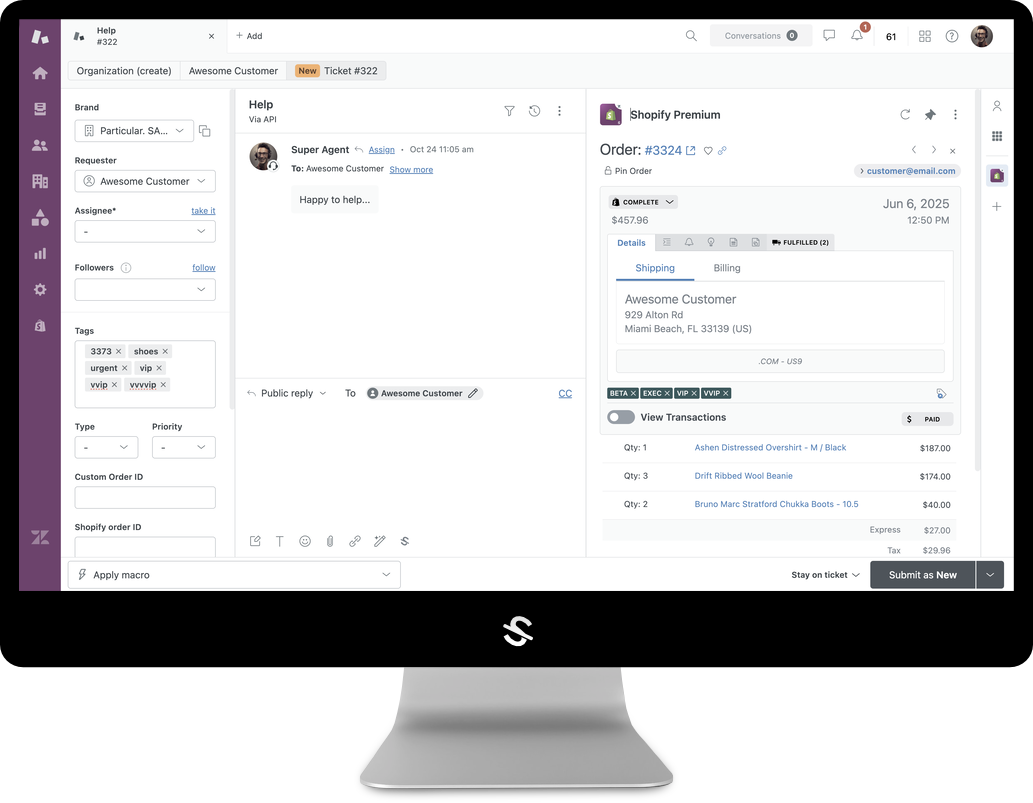
That is the ceiling of a read-only integration: an order summary in the sidebar, while every actual resolution — a refund, an address change, a canceled subscription, a replacement — happens somewhere else. Zendesk's answer to that gap is the action builder, and the workflows you build in it are action flows.
What an action flow is, in Zendesk's terms
Zendesk defines an action flow as a user-defined automated sequence of steps that performs actions in Zendesk and external systems based on a defined event. Every flow has one trigger and up to fifty steps.
Triggers
Ticket events (creation, field updates, routing, comments, SLAs, CSAT), user events, custom object events, IT asset events, schedules, and custom triggers fired by an inbound HTTP request. Critically for AI, there is also Run on demand — the trigger type an AI agent or agent copilot auto assist invokes. Only Run on demand flows can be called by an AI agent.
Steps
Three families: Zendesk actions (ticket, user, asset and custom object operations), external actions (third-party systems), and flow control — branches, waits, loops, custom variables and custom code. That last group is what lets a flow transform a payload rather than merely relay one.
The extensibility ladder
When the system you need is not already supported, Zendesk offers four rungs, in increasing order of effort and reuse:
- Prebuilt connectors — Slack, Jira, Salesforce, ServiceNow, Microsoft Teams, Google Workspace, Shopify, Stripe and a long tail beyond. Around 40 today, with 100+ signalled by the end of the year.
- Custom actions — call an API you specify, authenticated by a stored connection (API key, Basic, Bearer or OAuth 2.0). Quick to stand up, but scoped to your account and to the one use case.
- MCP servers — Zendesk can connect to public and private MCP servers and expose their tools as steps inside a flow.
- The Connector SDK — build a real, reusable connector rather than a one-off call.
Action flows are available across the Suite plans and on Support Team, Professional and Enterprise. Usefully, action flows invoked by AI agents do not consume action credits.
A careful note on the Connector SDK
@zendesk/connector-sdk is published on npm and describes itself as a framework for building integrations that connect external services to Zendesk Action Builder — a connector acting as a bridge between Zendesk and third-party APIs. A connector is assembled from three pieces: a manifest, an authentication definition (bearer token, API key, basic or OAuth 2.0, with an optional allowed_domain restriction) and one or more actions, each with typed inputs, a JSON Schema output and an execute function. Scaffolding, bundling, validation and publishing all run through zcli connectors commands.
Read the label before you plan around it. Every version published so far is a 1.0.0-eap prerelease, and Zendesk states plainly that connector development tools are in early access and currently available only to approved developers, with a waitlist to join. Today it is a direction of travel, not something you can build a rollout plan on.
One detail worth noting if you are weighing it up: the SDK is driven by zcli, the same Zendesk CLI toolchain agnoStack already uses to build and publish its own Zendesk apps.
If you want to work out what a connector would look like for your own stack, or want early access (EAP) to the agnoStack functionality being built around this, reach out to info@agnostack.com.
The commerce problem a connector list cannot solve
Zendesk's prebuilt commerce connectors cover the obvious names. Most real commerce stacks look nothing like that list. They are Magento or Adobe Commerce alongside a commercetools migration; a BigCommerce regional storefront; subscriptions in Recharge, loyalty in Yotpo, returns somewhere else again; and a warehouse system nobody outside operations has ever logged into.
Climbing the ladder per system per intent is possible. It is also how you end up maintaining forty brittle integrations that each break independently, and rebuilding every intent whenever a storefront replatforms.
Where agnoStack fits
agnoStack is a normalization layer, not another connector. It exposes one consistent commerce surface across a four-tier provider model:
- Commerce Providers — Shopify and Shopify Plus, Magento and Adobe Commerce, commercetools, BigCommerce, WooCommerce, Elastic Path. One Zendesk instance can connect several at once.
- Add-On Providers — subscriptions, loyalty, reviews, returns, shipping and tracking, marketing automation and payments.
- Integration Providers — your own Order and Customer Metadata, Insights and Timeline Events, for data that lives nowhere standard.
- Data Providers — Zendesk-native storage including Zendesk Custom Objects.
Because the surface is consistent, an intent built once behaves the same on commercetools as on Shopify. Human agents use it in the Agent Workspace; action flows and Custom Agents call the same operations — refunds with line-item granularity, pre-fulfillment order modification, subscription changes, returns and replacements, and Timeline Event writeback.
Flows that start outside Zendesk
The return path runs the other way too. agnoStack's Premium Zendesk for Shopify companion app puts Zendesk actions inside Shopify Flow, so commerce events drive support workflows with no middleware: raise a priority ticket on a high-value order, upsert a Zendesk user with a VIP tag at a lifetime-spend threshold, or open a ticket when a negative review lands.
The rule of thumb: conversation-initiated resolutions belong in Zendesk action flows; commerce-event-initiated workflows belong in Shopify Flow. Mature setups run both.
Designing your own
- Inventory the tab-switches. Watch five tickets end to end; every system an agent opens is a requirement.
- Separate read from write. Anything that mutates commerce state needs limits, approvals and an audit trail.
- Pick the trigger side — commerce event, or conversation.
- Decide what automation may touch before you expose a flow as Run on demand.
- Instrument per action, not per queue.
Want action flows that reach your whole back office? See agnoStack’s guides to Zendesk AI Agents, agentic commerce and enterprise data extension — then contact agnoStack or schedule a demo. For early access (EAP) to agnoStack's upcoming functionality in this area, reach out to info@agnostack.com.
Empowering retailers
of all types & sizes to provide faster, more seamless and more intuitive customer support regardless of software stack.